Library
A deep-sky project is rarely one night’s work. The Library makes sequences durable: save a dialed-in plan under a name, set per-filter hour goals, and every run — tonight’s, next week’s, next season’s — folds its captured frames into the same running total. When the sky clears, you load the entry and start, instead of rebuilding the plan from memory.
Open it with Library on the Sequencing screen. It has two tabs: Saved plans, the sequences you saved, and Past projects, every target your rigs have shot.
Saving a sequence
Section titled “Saving a sequence”From the Sequencing screen, choose Save to Library. The save sheet asks for:
- Name and notes — “M31 HaRGB”, “Veil two-panel”, whatever you’ll recognize in March.
- Per-filter hour goals — optional targets like 8h of Ha and 4h of OIII. A blank goal simply means no goal: the entry still accumulates stats, it just draws no progress meter for that filter.
The entry captures the whole plan: targets with their coordinates and framing, each filter entry’s exposure, count, and gain, and the pre- and post-sequence commands. A target’s planned start time is deliberately not saved — absolute dates don’t reuse across nights.
Saved plans
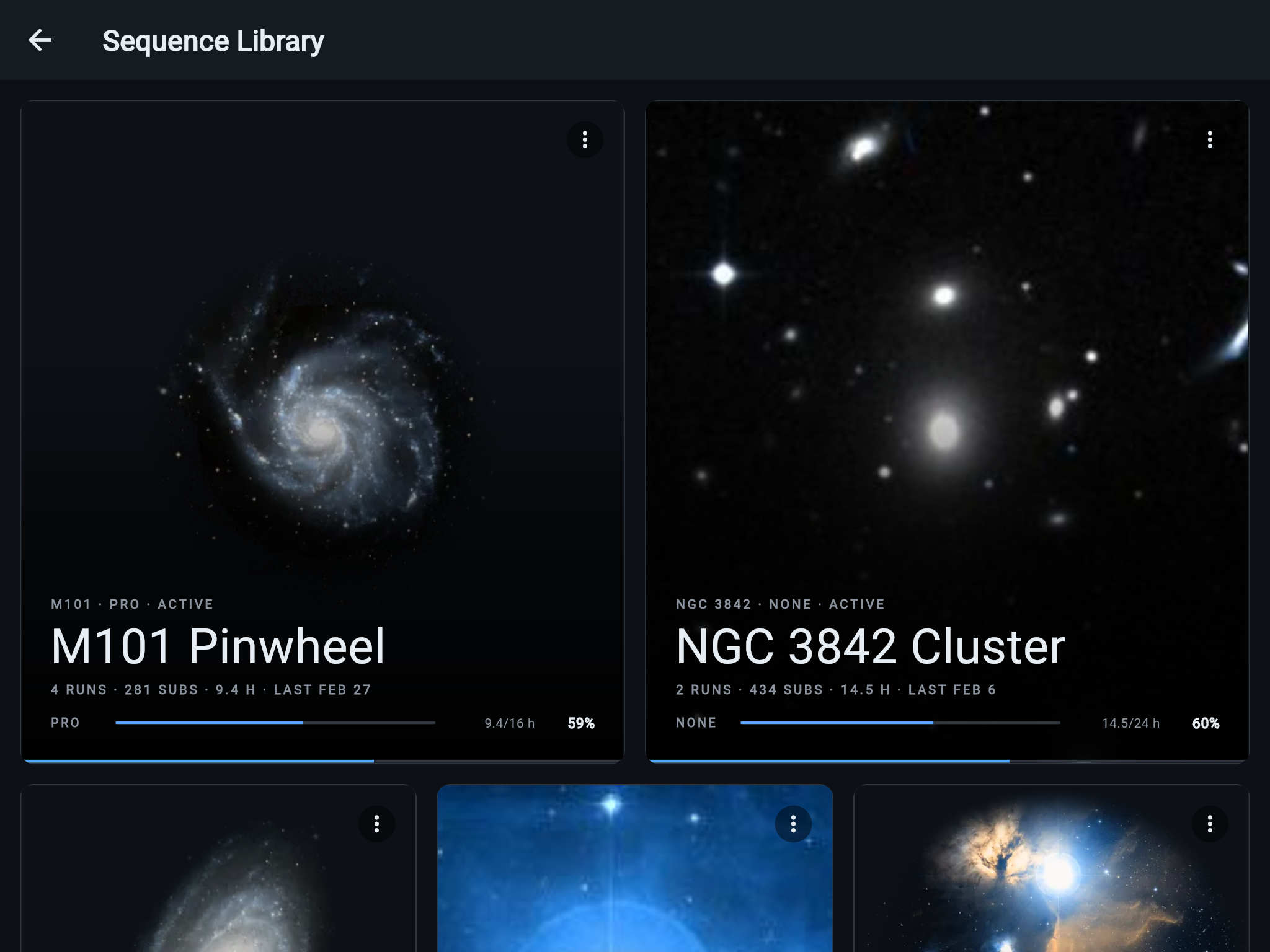
Section titled “Saved plans”Saved plans is photo-first: each tile shows imagery for the entry’s target, its per-filter progress meters, and an overall progress underline. Entries split into Active and Archived sections, and an entry whose sequence is running right now carries a LIVE chip with its stats updating as frames land. At the end, Recently Deleted lists the entries deleted on the connected rig (see below).
The detail view
Section titled “The detail view”Open an entry for the full picture:
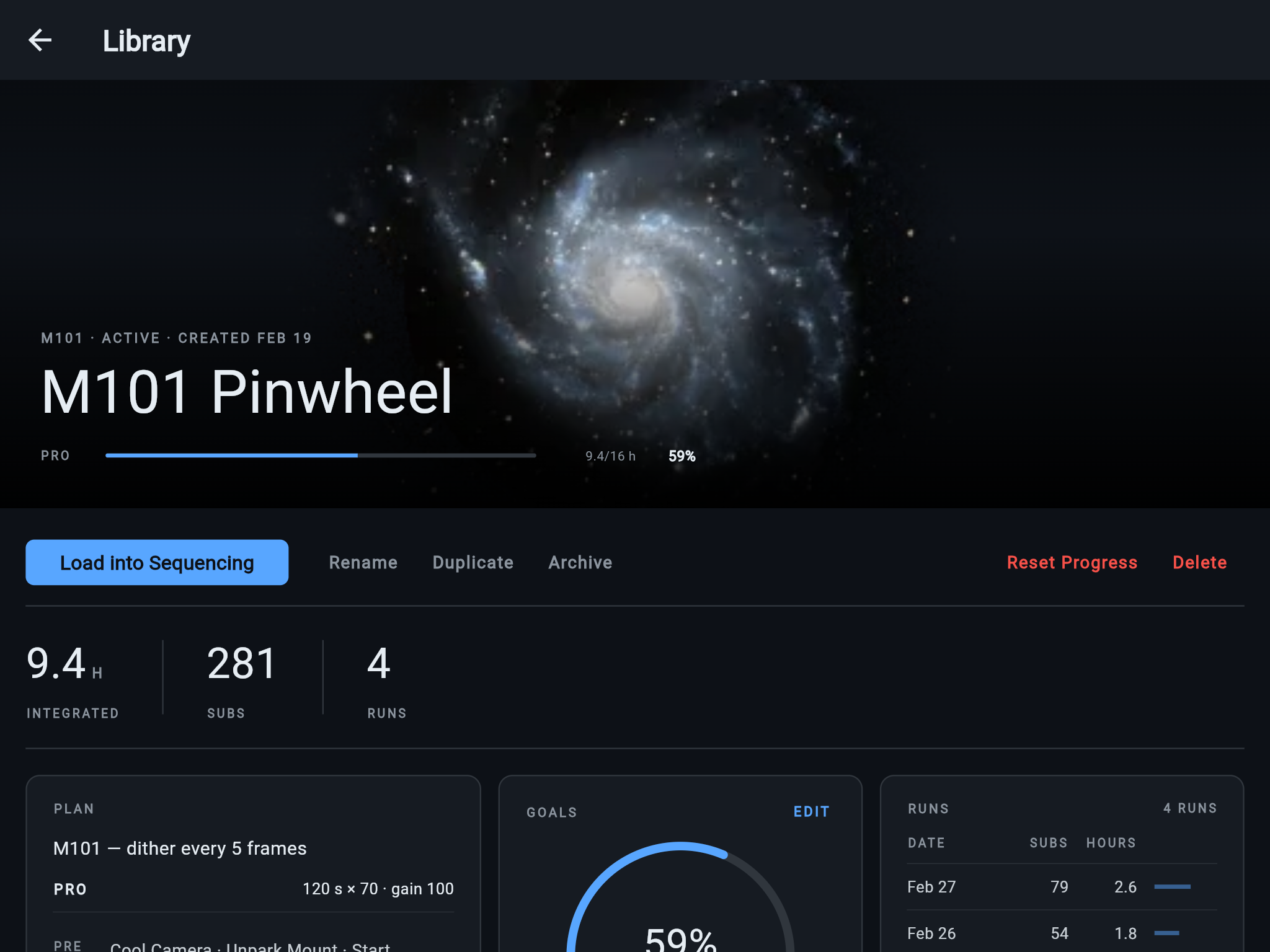
- Goals arc — overall progress toward the entry’s combined hour goals.
- Per-filter meters — acquired hours against each filter’s goal.
- Plan summary — the saved targets, filter plans, and commands, so you can confirm what will load before loading it.
- Run ledger — every run of this entry: when it ran, how it ended, and what it captured, per target and filter.
Loading it back
Section titled “Loading it back”Load into Sequencing fills the Sequencing screen with the saved plan in one tap — same targets, same framing, same filter entries, same pre/post commands. You start it exactly the way you start any sequence, and the run is attributed to the library entry automatically.
If the connected rig’s filter wheel doesn’t carry a filter name the entry uses, ARIS warns on that entry before you load — filter matching is exact, and it never quietly maps two similar names onto one slot. You can fix the wheel’s slot names, edit the plan after loading, or choose Load anyway.
Rename, duplicate, archive, reset, delete
Section titled “Rename, duplicate, archive, reset, delete”- Rename — the name is a label; stats and history stay attached.
- Duplicate — a fresh copy of the plan with empty stats, for pointing the same recipe at a new season or variation.
- Archive — moves a finished project out of the active gallery. Nothing is lost; unarchive any time.
- Reset Progress — re-baseline the meters to start a re-shoot.
- Delete — removes the entry after a confirmation. It moves to Recently Deleted at the end of Saved plans, where each rig keeps it for 30 days; Restore puts it back in your library, and every rig gets it again.
-
Choose Reset Progress on an entry you want to shoot again from zero.
-
Confirm. The progress meters restart from this moment — run history is kept. Every past run stays in the ledger; the meters simply stop counting frames captured before the reset.
How stats accrue
Section titled “How stats accrue”Stats are derived from run records the rig writes, never hand-incremented:
- Every run folds in — including runs you stop early, with their frames-so-far. A night that dies at 2am still credits the two hours it captured.
- Times run, last run, total subs, integration accumulate on the entry, and per-filter hours drive the meters.
- Live during a run — the running entry’s stats update as frames complete, so the LIVE tile is a progress meter for tonight, not just a memory of past nights.
Across rigs, and offline
Section titled “Across rigs, and offline”Signed in, the library lives at the account level: the same entries, goals, and run history on every device and every rig, across years. Each rig also keeps its own copy of the library, so browsing and loading keep working on the local network with no internet connection and no sign-in — the rig copy is what you see at a dark site. Run records originate on the rig and sync up when a signed-in device next connects, so a night the app slept through still lands in the ledger.
Past projects
Section titled “Past projects”Past projects lists every target any of your rigs has shot, whether or not it came from a saved plan. Each row shows the target’s total hours and subs, hours per filter, the nights it was shot, the rigs that shot it, and where the files are now: copied to a computer by Data Sync, or still only on a rig. The line at the top adds up hours, subs, and nights across every target.
Search by name, sort by Last shot, Most hours, or Name, and narrow the list to one rig. Open a row for each filter’s subs and sub lengths and each night’s hours. Shoot more loads the target into Sequencing, Show files opens its frames in the Files screen of a rig that still holds them or names the computers that have them, and Save as plan keeps it as a saved plan (a target that already has one offers Open saved plan instead).