Pairing an agent
A pairing key lets an AI client on your network work your rig through GUPPI. Each key is one agent: you set its trust, read its activity and revoke it on its own.
This page is for clients that reach the rig on its local network: Claude Code, LM Studio, and Anything MCP, meaning any client that speaks the Streamable HTTP transport. Claude’s web, desktop and phone apps and ChatGPT cannot reach your network; they connect through the ARIS relay instead. See Claude and ChatGPT.
Before you start
Section titled “Before you start”- You are signed in to ARIS with the account that owns the rig.
- The rig is claimed to that account. Keys are made for a claimed rig; claim it in Settings → Connection → Remote access (see Pair for Remote Access).
- Your plan includes GUPPI: Hobbyist and up.
- The rig is online when you make the key. Keys are made by your ARIS account, and the rig learns of a new key from ARIS within a minute.
Make a key
Section titled “Make a key”-
Open the client’s guide. Go to Settings → GUPPI and pick your client under CONNECT A CLIENT.
-
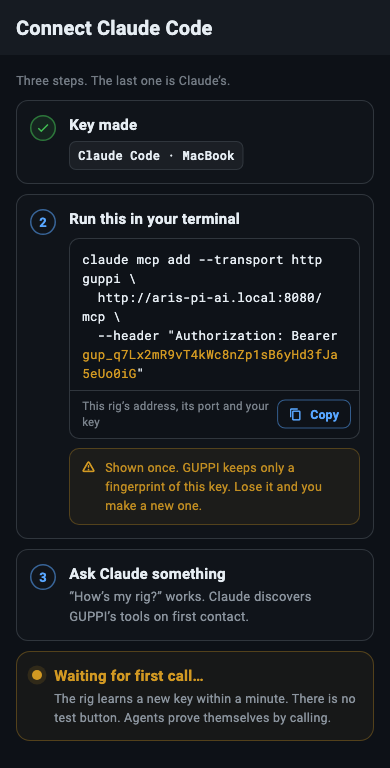
Name the key and tap Make key. One key per client, so you can set its trust and revoke it on its own. The name is how the agent appears on the GUPPI page, in the sentences the rig answers it with, and in the night journal, so a name that says which machine it is helps (“Claude Code · MacBook”).
-
Copy the command or the config. The next step shows it with this rig’s address and the new key already in it. It is shown once: GUPPI keeps only a fingerprint of the key, so if you lose it you make a new one. Leaving the page drops it.
-
Have the client call the rig. “How’s my rig?” works. The guide shows Waiting for first call… until the client calls. There is no test button; agents prove themselves by calling. The first call turns the card green (“Claude Code connected — say hello.”), with Open agent settings below it.
What each client gets
Section titled “What each client gets”The guide fills in the rig’s address for you: the one you reached the rig on, which the GUPPI page also shows under THIS RIG’S MCP ENDPOINT. Below, <rig address> and <your key> stand in for them.
Claude Code takes one command in your terminal:
claude mcp add --transport http guppi \ http://<rig address>/mcp \ --header "Authorization: Bearer <your key>"Claude discovers GUPPI’s tools on first contact.
LM Studio takes an entry in its mcp.json:
{ "mcpServers": { "guppi": { "url": "http://<rig address>/mcp", "headers": { "Authorization": "Bearer <your key>" } } }}Pick a model that can call tools.
Anything MCP gets the address and the header. Use the Streamable HTTP transport and send the key in that header on every request:
http://<rig address>/mcpAuthorization: Bearer <your key>Any tool call counts as the first call.
When Make key is not offered
Section titled “When Make key is not offered”Where a key cannot be made, the first step says why instead, with one action:
- SIGNED OUT: “Sign in to make keys.” Keys belong to your ARIS account; tap Sign in.
- NOT THE OWNER: “Only this rig’s owner makes keys.” Ask the rig’s owner to pair your client.
- FREE PLAN: “GUPPI connects agents on paid plans.” That is Hobbyist and up. In a browser the step also offers See plans.
- RIG NOT CLAIMED: “Claim this rig first.” Tap Claim rig.
Where a key works
Section titled “Where a key works”A pairing key works only on the rig’s own network. Over the internet the rig refuses it before reading it, with “Request denied: a pairing key works only on the rig’s local network. Over the internet, connect this agent through the ARIS relay.” Relay keys work the other way round: only through the relay, never on your network.
The rig checks keys itself, so a paired client keeps working on your network while the rig has no internet, at a dark site for example, until the key expires. Keys renew while the client uses them. A rig holds up to 10 pairing keys at a time; revoke one to make another. Until a rig holds a key, the GUPPI page says MCP is off on this rig.
The CONNECTED list
Section titled “The CONNECTED list”The GUPPI page lists the built-in GUPPI first, then one row per key from the moment the rig hears of it: WAITING until its first call and PAIRED after, with when it last called and its trust level (“Last seen 2h ago · Watch only”). Tap a row for the agent’s trust dial, its tools, its recent activity and Revoke access.
Every new key starts at Watch only: it reads the rig and changes nothing until you raise its trust. See The trust dial and approvals.
Revoke a key
Section titled “Revoke a key”On the agent’s page, tap Revoke access. Its key stops working on this rig, and nothing else changes. Revoke all agents, at the bottom of the GUPPI page, revokes every key on the rig; a relay connection that reaches the rig ends on every rig it reaches.
The rig drops a revoked key at its next check-in with ARIS, within a minute while it is online. A rig with no internet keeps accepting the key until it is back online. To connect the client again, make a new key.