Rachio Sprinkler Standby
A backyard rig shares the yard with the irrigation. ARIS pairs with a Rachio smart sprinkler controller so your lawn watering never rains on an open telescope: while a rig you’ve marked as outside is powered on, ARIS holds your watering — and releases it the moment the rig comes back in.
The hold itself is a Rachio rain delay — the same reversible mechanism a storm uses, visible in the Rachio app while it stands. ARIS re-places it every few minutes while a rig is out, so a hold can never quietly lapse mid-session.
It’s built fail-safe. Every error path — a network blip, an expired token, Rachio’s API having a bad minute — leaves the watering held, never accidentally running. And it’s connection-only: ARIS talks to Rachio over Rachio’s own cloud API. Nothing touches your controller’s wiring, and you never move a wire to set it up.
Get your Rachio API token
Section titled “Get your Rachio API token”Your Personal API Token is a private key that lets ARIS pause and resume schedules on your behalf. To find it:
- Sign in to the Rachio web app at app.rach.io (the same account as your controller).
- Open Account Settings.
- Choose Get API Key and copy the token it reveals.
In the ARIS setup screen, the Get my token link opens this page for you.
Enter and test your token
Section titled “Enter and test your token”Open Settings → Rachio Sprinkler and you’ll land on the setup screen.
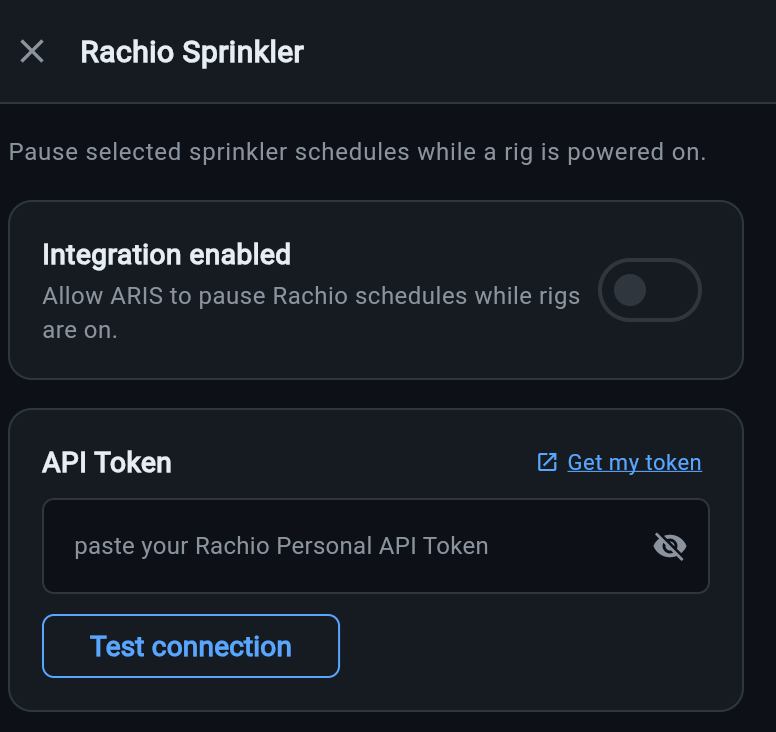
- Turn on Integration enabled — this is the master switch that lets ARIS hold your Rachio watering while a rig is outside.
- Paste your token into API Token. The field is masked; tap the eye icon to check what you pasted.
- Tap Test connection. ARIS reaches Rachio and reports back what it found — for example, “Found 1 controller · 4 schedule rules.”
- Tap Save.
If the test fails, ARIS shows the reason (most often a mistyped or expired token). Re-copy the token from app.rach.io and test again.
Choose what stands down
Section titled “Choose what stands down”The Standby mode selector decides which controllers ARIS holds while a rig is outside. Pick the one that matches your yard.
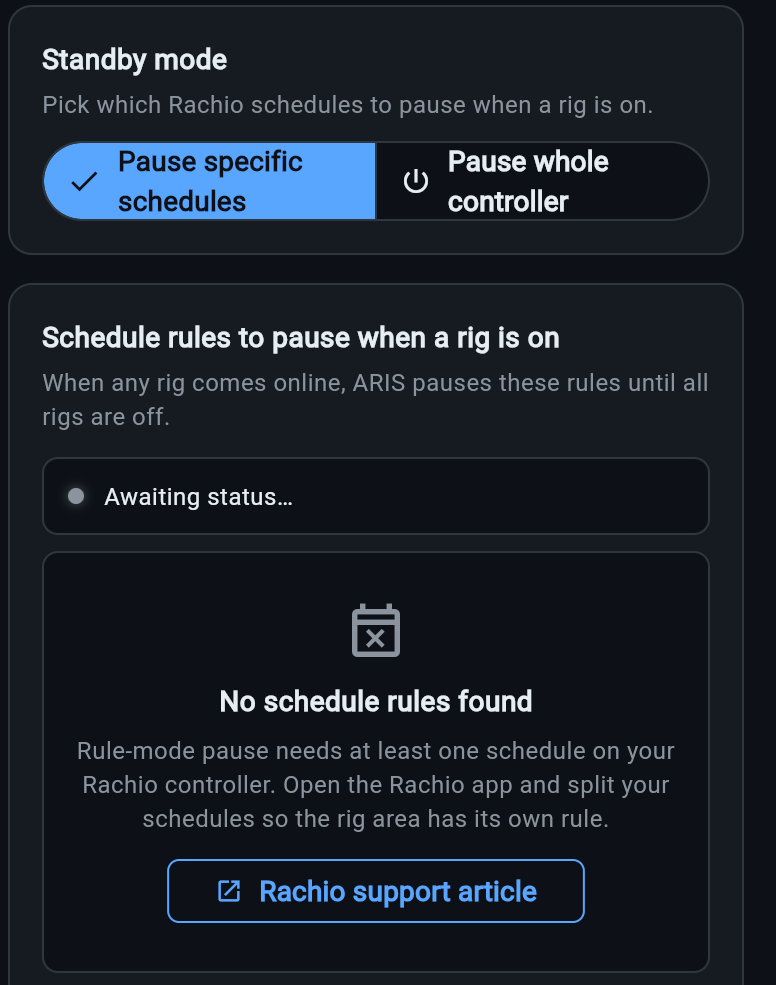
Pause specific schedules (recommended)
Section titled “Pause specific schedules (recommended)”Pause specific schedules starts from what you actually know — which schedules water the spot where the rig sets up — and lets ARIS work out the plumbing. After a successful test, ARIS lists your Rachio schedule rules as cards. Each card shows the schedule’s name, which controller it’s on, and the zones it runs. Tick the schedules that water where your rig lives.
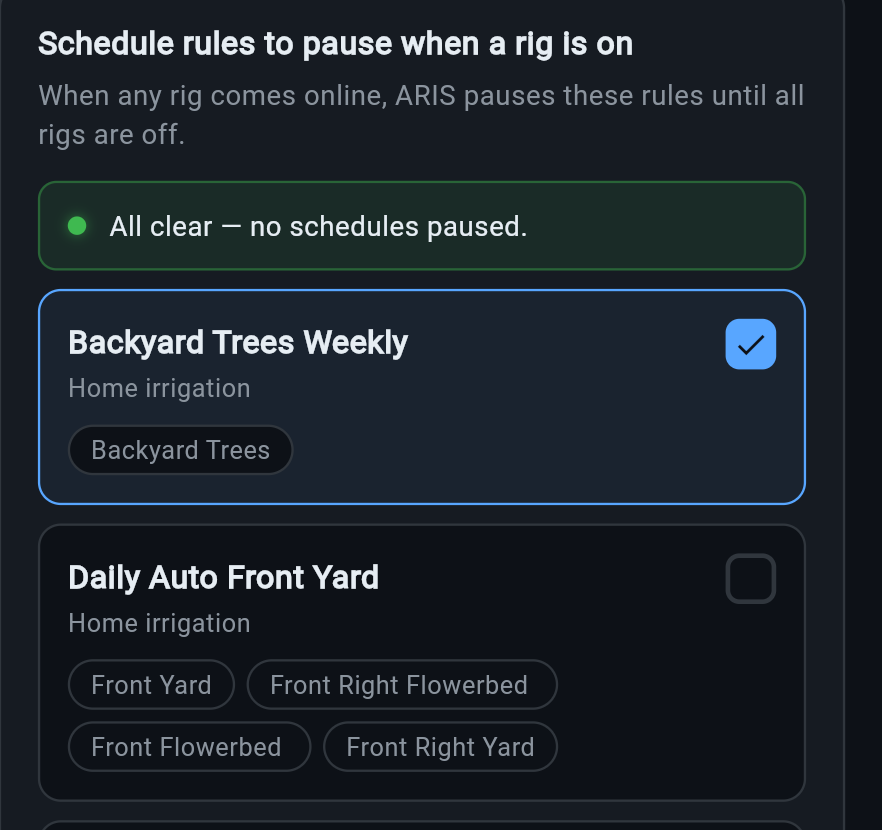
The ticked schedules tell ARIS which controllers to hold: the rain delay lands on whichever controller your selected schedules live on, and if a ticked schedule is actively running at that moment, it is stopped. On a multi-controller property, only the rig’s controller stands down — a controller hosting none of your ticked schedules is never touched. The green banner up top is the live status: it reads All clear when nothing is held, and switches to Currently paused while a rig is out.
Nothing is selected for you. Pausing every schedule would dry out your whole yard on any night you image, so the choice is always yours to make deliberately.
Pause the whole controller
Section titled “Pause the whole controller”If a whole controller only ever waters the rig area — or you’d simply rather stop everything to be safe — switch to Pause whole controller and pick the controller(s) to put in standby. Every schedule on a selected controller is held while a rig is outside, and the controller is additionally placed in Rachio standby as a second layer.
In schedule mode, the controller is normally detected from your selected schedules automatically; an Advanced section on the schedule-picker screen lets you override that detection and pick the controller by hand if you ever need to.
How standby behaves at night
Section titled “How standby behaves at night”Once it’s set up, sprinkler standby is hands-off — and it follows where the rig actually is, not merely whether it’s powered:
- Each rig carries an Inside / Outside switch on its sprinkler chip, on the rig dashboard. It’s a statement of fact: this rig is in the yard or this rig is on the shelf.
- While a rig is Outside, ARIS holds your watering with the rolling rain delay, refreshed every few minutes. The chip reads watering held, with the time left on the hold.
- Flip it to Inside and ARIS releases the hold immediately and touches nothing from then on — the chip reads sprinklers normal. A rig that lives indoors, powered around the clock, never suppresses your watering.
- If ARIS genuinely can’t tell where the rig is — say it power-cycled and nobody has answered yet — it fails safe: watering stays held and the chip asks you where the rig is. A dry lawn beats a sprayed telescope.
- If the hold could not be placed — expired token, Rachio unreachable — the chip turns into a loud red not held alarm. That is the one state where the equipment is actually exposed, and it is the only state that looks alarming.
The setup screen shows a live status banner so you always know where things stand:
| Banner | Meaning |
|---|---|
| Currently paused: N rules | The hold is active; watering releases when the rig comes back inside. |
| Pausing schedules… / Restoring schedules… | ARIS is applying or lifting the hold right now. |
| All clear — no schedules paused | No rig is outside, or nothing is selected; watering runs normally. |
| Partial | Part of the selection couldn’t be applied, so ARIS engaged whole-controller standby as a fallback to keep water off. |
| Standby error | Something went wrong — details appear just below. Errors fail toward water off, so the hold stands. |
- The token lives on your rig. Sprinkler settings are stored per-rig, so every device you sign in from sees the same configuration.
- One controller, mixed yard? The hold is controller-wide while the rig is outside — that’s the price of a hold that’s reversible and safe to re-assert. Everything on the controller resumes its normal schedule the moment you flip the rig to Inside.
- Rachio was our first sprinkler integration. ARIS frames this as sprinkler standby generally, starting with Rachio; support for more controller brands may follow.