Weather Intelligence
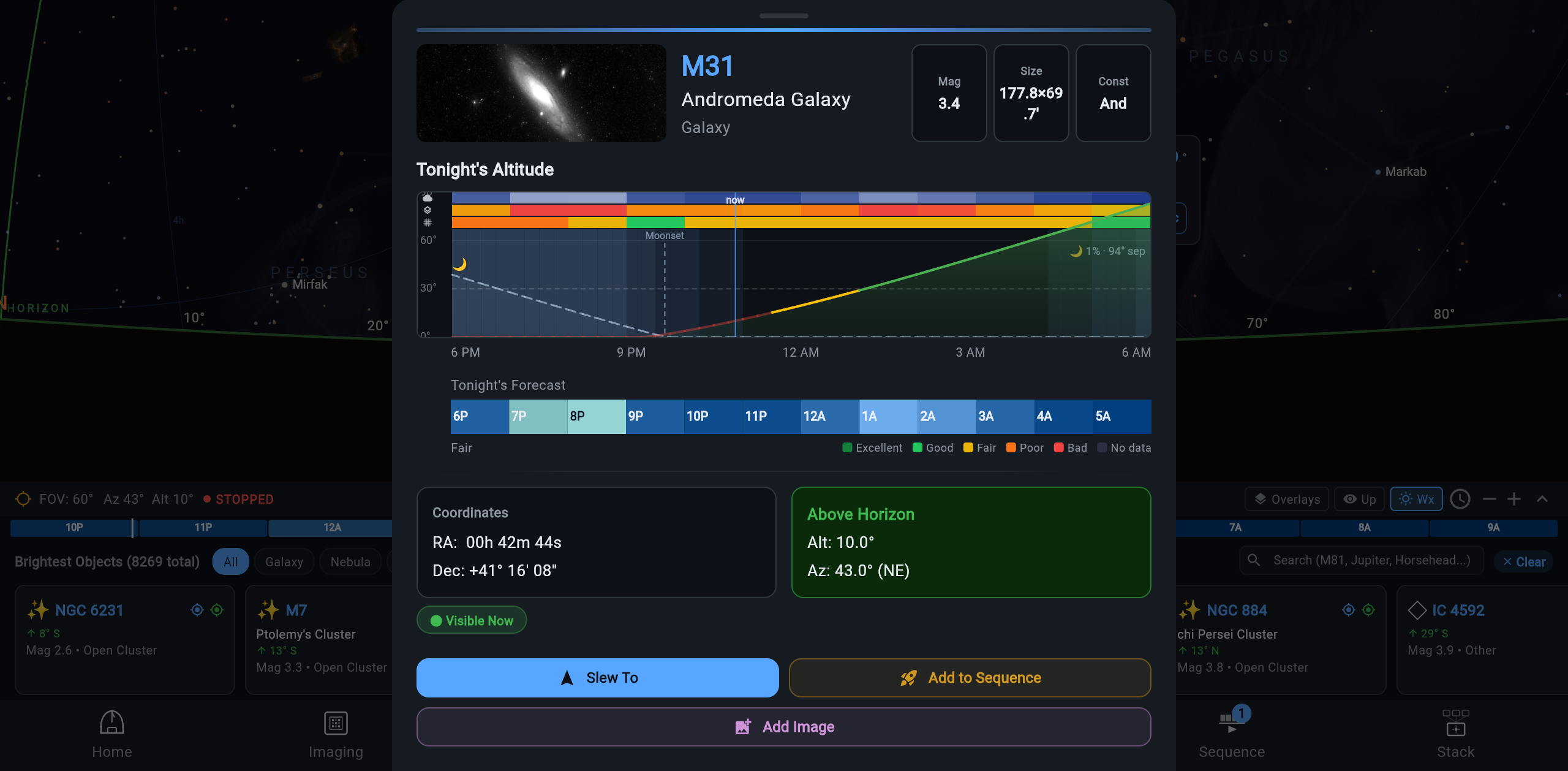
The Plan screen carries an hour-by-hour forecast strip built for imaging decisions: cloud cover, seeing, and transparency for the night ahead, with the hours worth imaging highlighted. It answers “is tonight worth setting up?” at a glance, from any device connected to the rig.
Where the forecast comes from
Section titled “Where the forecast comes from”The strip needs no setup. Out of the box it comes from Open-Meteo, a free forecast that covers the whole world: cloud cover, temperature, dew point, wind, humidity, and rain.
Seeing and transparency come from your own Astrospheric account:
- You need an Astrospheric Professional membership — forecast API access is a Pro feature on their side.
- Copy your API key from the My Profile tab in Astrospheric.
- In ARIS, open Settings → Weather Forecast and paste the key.
Astrospheric covers North America, Greenland, Iceland, Ireland, and the UK. For a rig inside that area, every value Astrospheric supplies is the one you see, and Open-Meteo fills in what Astrospheric does not have, such as rain. For a rig outside it, the forecast stays on Open-Meteo.
The key is stored on the rig computer, so every device that connects to that rig gets seeing and transparency. In a multi-rig fleet, enter it once per rig — all rigs can share the same Astrospheric account.
Reading the strip
Section titled “Reading the strip”Each hour is a chip colored by that hour’s rating, from Excellent to Bad. The rating is set by the worst of three values:
- Cloud cover — the fraction of sky expected to be clouded. The number that vetoes everything else.
- Seeing — atmospheric steadiness. Poor seeing bloats stars and softens detail; it matters most at long focal lengths and for planetary work.
- Transparency — how much light actually gets through the atmosphere. Haze, smoke, and high moisture lower transparency even under a cloudless sky, which costs you faint detail.
On a target’s detail sheet, tap an hour for its values and what limits it. If you already read Astrospheric for your go/no-go call, the dots beside seeing, cloud, and transparency there use Astrospheric’s own colors. Without an Astrospheric key there is no seeing or transparency, so an hour rates Good at best.
Golden windows
Section titled “Golden windows”When cloud cover, seeing, and transparency line up, the strip highlights the stretch as a golden window — the hours to protect for imaging. If the window opens at 1am, that is your answer to “should I stay up or set an alarm?” You can also ask GUPPI “when’s the best window tonight?” and get the same data as a sentence. A golden window needs seeing and transparency, so it comes with an Astrospheric key.
The rig’s sky, not yours
Section titled “The rig’s sky, not yours”Forecasts are for the rig’s site. Each rig learns its own location — from the mount’s GPS readback, or from a one-tap push of your device’s location while you are at the rig — and the forecast follows the rig from then on.
This matters the moment you view remotely: if your rig is at a dark-sky property and you are in the city, the strip shows the rig’s sky, not the weather outside your window. Every rig in a multi-rig fleet forecasts for its own site. The hour labels read the site’s clock too, so a remote rig’s night is labelled in the rig’s own hours.
Where it appears
Section titled “Where it appears”- Plan screen — a compact strip of the coming hours under the sky atlas (the Wx button shows or hides it), and the whole night’s strip on each target’s detail sheet, below the altitude chart.
- SkyNode — the conditions bar shows Rain ~3h (or Rain <1h) when rain is forecast in the next 12 hours, unless a rain sensor already reports wet.
- GUPPI — forecast and golden-window questions answered in chat.
Forecasts are planning information. They never gate a running sequence — condition-based pausing is Guardian night mode (opt-in), which acts on what the rig actually measures, not on a forecast.
Forecast plus a live sky
Section titled “Forecast plus a live sky”A forecast tells you about the hours ahead; it cannot tell you what is overhead right now. If you run SkyNode with an all-sky camera, the two complement each other: plan the night with the forecast strip, then let live cloud detection show you what the sky is actually doing over your targets. When the forecast said clear but a sheet moved in early, SkyNode is the one telling the truth.
Data source
Section titled “Data source”Forecast data is provided by Open-Meteo (weather data by Open-Meteo.com, CC BY 4.0) and, with your key, by Astrospheric.
Current limitations
Section titled “Current limitations”- The NINA plug-in serves the Astrospheric forecast alone, so a NINA rig needs your key and a site inside Astrospheric’s coverage. The Open-Meteo layer comes with the ARIS backend that runs beside NINA, which the plug-in download does not include yet (see NINA Integration).