The trust dial and approvals
Every agent connected to a rig has a trust dial with three levels. The rig holds each agent’s level and checks it on every call; the app is where you set it. Every new agent starts at Watch only.
The three levels
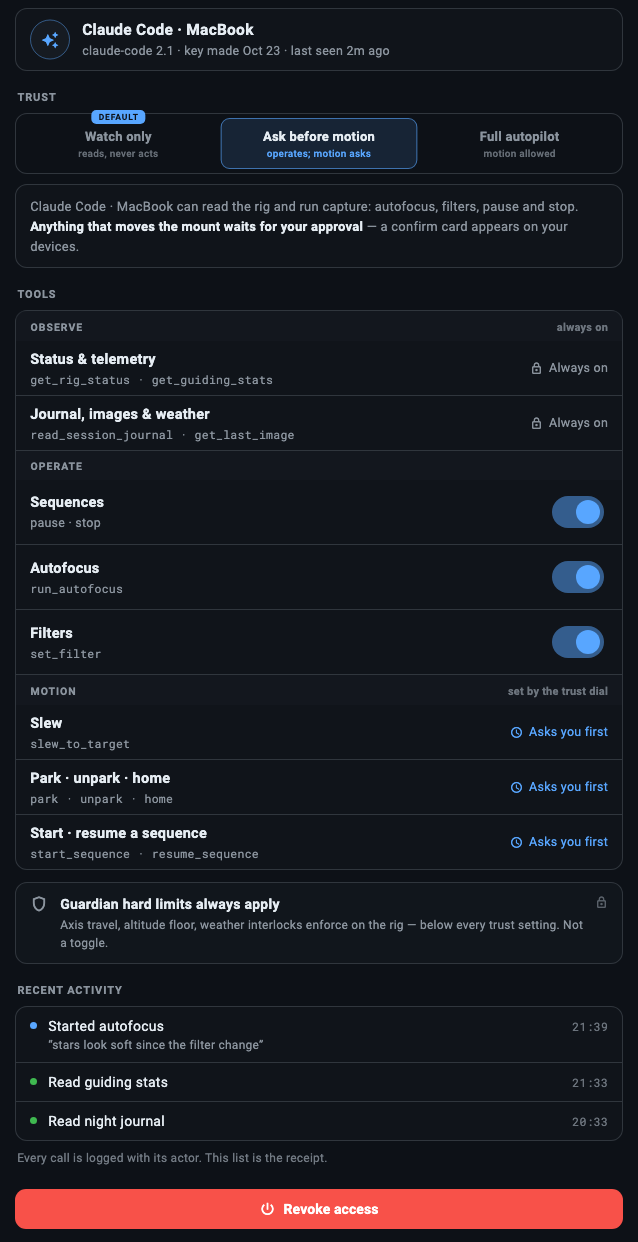
Section titled “The three levels”Open an agent’s page from Settings → GUPPI by tapping its row. The dial is under TRUST, with DEFAULT marked on Watch only.
| Level | On the dial | The agent may |
|---|---|---|
| Watch only | reads, never acts | Read the rig: status, guiding, the sequence, the night journal, the latest frame, tonight’s visibility of a target, the saved sequences in your Library. Nothing else. |
| Ask before motion | operates; motion asks | Also run autofocus, change filters, and pause or stop a sequence. Anything that moves the mount waits for your approval. |
| Full autopilot | motion allowed | Also move the mount without asking, through every limit the rig applies to your own taps. The rig tells you what it did. |
The line under the dial says the same thing for the agent in front of you. At Ask before motion, for an agent called Claude: “Claude can read the rig and run capture: autofocus, filters, pause and stop. Anything that moves the mount waits for your approval — a confirm card appears on your devices.”
Every tool is listed for every agent; the dial decides when the agent calls. A tool belongs to one of three tiers:
| Observe | Operate | Motion | |
|---|---|---|---|
| Watch only | runs | refused | refused |
| Ask before motion | runs | runs | waits for your approval |
| Full autopilot | runs | runs | runs |
- Observe:
explain_rig,get_rig_status,get_equipment,get_mount_state,get_guiding_stats,get_sequence_progress,get_autofocus_status,get_weather_allsky,get_last_image,read_session_journal,check_target_visibility,list_saved_sequencesandget_approval_status.explain_rigtells the agent its own level on this rig. - Operate:
run_autofocus(it starts now on an idle rig; during a sequence it is queued for the sequence’s next frame),set_filter(refused while a sequence runs: the sequence owns the filter wheel),pause_sequenceandstop_sequence(stopping aborts the exposure and any motion, and a stopped run cannot be resumed). - Motion:
slew_to_target(a catalog name or coordinates, centered by plate solve unless the agent says not to),home,park,unpark,start_sequence(a saved sequence from your Library, started exactly as the app’s Start button starts it) andresume_sequence(a paused run, or one waiting at its checkpoint after a restart).
No level gives an agent raw axis moves, a sync, a pulse guide, a tracking rate, a site or time change, or a firmware, driver or limit setting, and no agent can edit a saved sequence through GUPPI.
Per-tool switches
Section titled “Per-tool switches”Under TOOLS, the agent’s page lists what it can use:
- OBSERVE is always on.
- OPERATE has one switch per group: Sequences (pause and stop), Autofocus (
run_autofocus) and Filters (set_filter). A switch only takes a tool away: the dial decides first, and a group switched off is refused at every level. At Watch only the switches are dimmed, and keep what you set for when you raise the dial. - MOTION has no switches; the dial alone sets it. Its rows (Slew, Park · unpark · home, Start · resume a sequence) say what the agent’s level does with them: Off at Watch only, Asks you first or Runs on its own.
When the rig says no
Section titled “When the rig says no”A refused call answers the agent with one sentence it can pass on to you. It names the agent as you named its key, and the one place to change it:
Request denied: Claude Code is set to Watch only. Change its trust in ARIS → Settings → GUPPI → Claude Code.
Request denied: Autofocus is switched off for Claude Code. Switch it on in ARIS → Settings → GUPPI → Claude Code.
The rig’s own checks apply to an agent as they do to you: a filter change is refused while a sequence owns the wheel, and a slew or a sequence start while a sequence runs.
Approvals
Section titled “Approvals”At Ask before motion, a motion tool moves nothing when the agent calls it. The rig queues a request and tells the agent it is waiting for your approval in the ARIS app.
The request reaches you as:
- A card in the app, over whatever screen is open: who asks (“Claude asks to move the mount”), what for (“Slew to M31, Andromeda Galaxy”), where the target stood when asked (altitude, azimuth, east or west of the meridian), whether it is then centered by plate solve, the agent’s reason, and Approve and Deny. Under the buttons: “Every rig limit still applies when you approve. Asked because Claude is set to Ask before motion.”
- A row in the notification bell, with the same Approve and Deny.
- A push on an iPhone or iPad, through Guardian’s alerts. It needs the rig online, and muting Guardian’s alerts mutes it; the card in the app still appears.
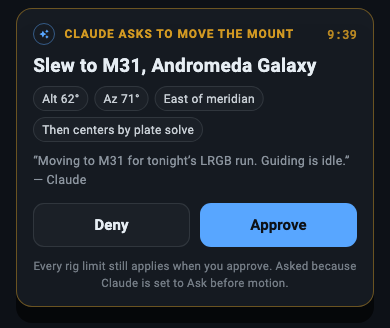
Answering on one device clears the request everywhere.
A request to start a saved sequence names the sequence, says it is “From your Library, as you saved it”, and lists what the run will do, in the order the rig does it. Under the buttons: “The sequence runs under Guardian like one you started. Pause or stop it any time”, with “Claude can too.” when the agent’s trust and switches let it.
The rules
Section titled “The rules”- 10 minutes. A request nobody answers expires, and the agent is told “Nobody approved in 10 minutes.”
- One at a time. An agent has one request waiting at a time. Asking for the same thing again answers the one already waiting; asking for something else is refused until that one is answered.
- After a denial. The agent is told “Request denied by you.” and to ask you before it requests motion again, and the rig refuses its next motion request for 5 minutes.
- 10 an hour. An agent can start at most 10 motion actions in an hour, asked for or run on Full autopilot. A sequence’s own slews are the sequence’s, not the agent’s, and do not count.
- Withdrawn. Changing an agent’s trust, or revoking it, withdraws its waiting request.
- In memory. Requests live in the rig’s memory: a restart of the rig’s software drops them, waiting ones included.
Approving checks everything again
Section titled “Approving checks everything again”Approving runs every check again at that moment, as if you had tapped the action yourself: the rig’s altitude floor, a sequence that has started, a closed cover, a mount that needs homing after a power loss, the mount’s clock, polar alignment, and the agent’s key and trust. If any of them refuses, nothing moves, the card says why, and the agent is told. Approving a sequence start builds the start again from your Library and the rig’s settings at that moment; if the saved sequence changed since the agent asked, nothing starts. A target under the altitude floor or below the horizon is refused before you are asked at all.
On the lock screen
Section titled “On the lock screen”On an iPhone or iPad, the push for a request carries Approve and Deny. Approve needs the device unlocked. Both open the ARIS app, which sends your answer over its own sign-in and its connection to the rig. The built-in GUPPI’s confirmations carry the same two buttons.
On Android, the push for a request has no Approve or Deny yet: tap it to open the app, and answer on the card or in the bell.
Full autopilot
Section titled “Full autopilot”At Full autopilot a motion tool runs at once, through the same route the app’s own button uses, so every limit that applies to your tap applies to the agent’s. A notice tells you what it did, at most one push per agent and tool every 30 minutes; the night journal keeps every one.
Receipts
Section titled “Receipts”Every write an agent makes, every write it is refused, and every motion request with its answer goes into the rig’s night journal, worded for a person, with the agent’s name and its reason when it gave one: “Claude asked to slew to M31, Andromeda Galaxy: approved by you. …”. A refusal the agent keeps repeating is recorded once every 10 minutes, with a count of the repeats, so a looping agent cannot crowd the night’s own events out of the journal. Each trust change you make is recorded too.
The agent’s page lists its recent calls under RECENT ACTIVITY, reads included, since the rig’s software last started: “Every call is logged with its actor. This list is the receipt.” A motion request shows as one row with its answer, such as “Requested slew to M31 · approved by you”.
An agent’s actions, approved ones included, do not count as you being at the rig. Guardian’s rules for a person at the rig, such as holding back for 10 minutes after you take manual control, are not set off by them.
Who can change trust and answer requests
Section titled “Who can change trust and answer requests”Never an agent. A request that carries an agent’s key is refused outright, whatever else it carries: an agent cannot raise its own trust or anyone’s, switch a tool back on, or answer a request, its own included. The built-in GUPPI cannot change its own dial either.
Over the internet, and on a rig that requires sign-in on its network, only the owner’s signed-in ARIS app can change trust or answer a request.
The built-in GUPPI
Section titled “The built-in GUPPI”The built-in brain has the same three levels. Its dial is in Settings → Guardian & Automation, under GUPPI actions, because its actions are Guardian’s playbooks: pause subs, resume subs, re-run autofocus, restart PHD2, safe park and reacquire target. Each playbook has a tier you set: Ask first, Do it + notify or Do it silently.
- Watch only, the default: GUPPI runs no playbook. “Watch only turns every action off.”
- Ask before motion: GUPPI runs each playbook as you set it, except the three marked MOVES THE MOUNT (resume subs, safe park, reacquire target), which ask you first whatever their tier: “Asks first at Ask before motion.”
- Full autopilot: GUPPI runs each playbook as you set it, the ones that move the mount included.
The dial never changes a tier you set, so raising it puts each one back as you left it. Safe park never offers Do it silently: a park always tells you.
A playbook at Ask first, or one the dial makes ask, waits for your confirmation. It shows under GUPPI actions as “GUPPI is waiting for your go”, with a Run button, and comes as a push on an iPhone or iPad. It expires after 30 minutes; a Deny on the lock screen runs nothing and lets it expire. Turning the dial down to Watch only withdraws every confirmation still waiting, and one answered after that is refused.
The dial governs GUPPI, not Guardian. When Guardian itself recovers in Night mode, it reacquires the target, or restarts PHD2 when PHD2 has stopped answering, on its own only when that playbook’s tier is Do it + notify or Do it silently, whatever GUPPI’s dial says. See Rig Guardian.