Rig Guardian
Rig Guardian is ARIS’s night watchman. It runs on the rig itself and watches the signals your session already produces — guiding health, sky state, sun altitude, sequence progress, device liveness, disk space — so that when something goes wrong at 3am, the rig responds sensibly and you find out about it.
Guardian is deterministic by design. It is not an AI making judgment calls in the dark: every decision comes from plain state machines with fixed thresholds, bounded retries, and hardware interlocks. You can read exactly what it will do in a given situation, and it will do the same thing every time.
Guardian runs on ARIS rig computers, both Raspberry Pi and GPU-accelerated rigs. NINA rigs run part of it, in the ARIS backend that the plug-in starts beside NINA (not in the plug-in download yet): dawn ends their runs (below), Night mode holds new subs and re-acquires a lost guide star there too, and the alerts reach your phone the same way. The safe state on failure and GUPPI playbooks are not available on NINA rigs yet — see NINA Integration.
On by default
Section titled “On by default”Four Guardian behaviors are active out of the box. None of them require setup.
Night journal
Section titled “Night journal”Every event of the night is persisted on the rig: sequence progress, guiding holds and recoveries, autofocus runs and results, meridian flips, alerts, and every action Guardian takes. The journal is written to the rig’s own disk, one file per night, and survives restarts.
The journal is always recording — muting alerts never stops it. It is the substrate for the morning report (below), and for answering “why did my sequence stop?” with receipts instead of guesswork.
Alerts
Section titled “Alerts”Guardian ranks events by severity and notifies you accordingly:
- Critical alerts push to your phone’s lock screen immediately. These are the failures you genuinely need to know about at 3am: a failed meridian flip that may have left the mount still tracking, a sequence that died unattended, or a rig that restarted and is waiting for your go-ahead to resume.
- Warnings are batched per class — guiding instability, cloud holds, autofocus failures — so a flapping guide star sends one useful notification, not forty.
- Recovery notices tell you when a problem fixed itself, so an earlier warning doesn’t leave you wondering until morning.
Alerts appear in the in-app notification bell as well as on the lock screen. Lock-screen push requires the rig to be online; everything else works on the local network alone.
Safe state on failure
Section titled “Safe state on failure”If a sequence dies unattended — a failed flip, a full disk, a crash — Guardian returns the mount to your configured safe state and warms the camera, instead of leaving the mount tracking toward the pier. Choose one of three actions:
- Home (default) — slews to the home position. No park lock is engaged, so resuming later needs no unpark.
- Park — engages the mount’s park lock until you unpark.
- Tracking off — stops motion where the mount points.
The safe-state action applies to unattended failures only. When you stop a sequence yourself, or you are actively working at the rig, ARIS skips it — you are in charge.
Dawn ends every run
Section titled “Dawn ends every run”When the sun rises past 6° below the horizon, ARIS ends the sequence, whether or not Night mode is on:
- The flat-panel cover closes first, so the optics are covered even if a later step fails. To leave the cover alone, turn off Close the cover at dawn in the flat panel’s settings; the run still ends at dawn.
- Your sequence’s post-sequence steps run next — park or home, warm the camera — and the cover is checked once more as the run ends.
- The mount is left stopped. After those steps ARIS turns the mount’s tracking off and checks that it stopped, so a mount the steps did not take home is not left tracking into the day. If the mount does not confirm it, is no longer connected to ARIS, or your own Home or Park step failed, a critical notification tells you to check the rig.
- One notification says dawn ended the sequence, how many frames it captured, and what runs next.
A sequence that is paused when dawn comes ends the same way, from wherever it paused, and its notification says it was paused and why. If the rig restarts while the post-sequence steps run, resuming the sequence picks up the dawn end where it stopped.
With Night mode on, Guardian also stops starting new subs once the sun is 12° below the horizon, and tells you the warm shutdown follows at 6°. On an ARIS rig computer no meridian flip runs in that stretch, since no sub would follow it: a mount nearing the pier is stopped short of it instead and stays stopped until the run ends at dawn.
Dawn needs the rig’s location: a rig with no saved site has no sun to read, and its runs are not ended at dawn.
On a NINA rig the cover closes, then NINA runs the End area of its sequence. Two parts of the above are not on NINA rigs yet: the tracking check after the steps, and ending a paused run. A NINA sequence that is paused at dawn stays paused with its cover closed, and resuming it, from ARIS or from NINA’s own window, ends the run for dawn instead of going back to the targets.
Opt-in features
Section titled “Opt-in features”Two Guardian capabilities ship off by default. Both are enabled per rig in Settings → Guardian & Automation.
Night mode (early access)
Section titled “Night mode (early access)”Night mode lets Guardian pause and resume your sequence based on conditions:
- When guiding degrades or the sky turns bad, Guardian holds new subs at the frame boundary. The exposure in flight completes, and any sub taken during trouble is flagged for review — never deleted. The one exception is a guide star running away (PHD2 correcting at its maximum while the error keeps growing): that sub is aborted and shot again, and guiding is stopped. Tracking stays on and the guider keeps looping, so a passing cloud often costs nothing but the hold itself.
- When conditions clear, Guardian resumes automatically. If the guide star doesn’t come back on its own, Guardian runs target reacquisition: it first checks whether a meridian flip came due during the hold, re-centers with a plate solve when the hold was long, re-acquires the guide star, proves guiding is stable, and only then resumes frames. After a runaway, or after PHD2’s corrections stopped reaching the mount, the target is re-centered before the next frame however short the hold, because the field may have moved.
- Recovery is bounded. If attempts keep failing, Guardian gives up safely — safe state, critical alert — rather than retrying all night.
Night mode is early access and off by default while it accumulates proving nights. Meridian flips, autofocus triggers, and the rest of the sequence runner behave identically whether it is on or off.
If you take manual control mid-night — a slew, a focus run, a park, starting a sequence — Guardian holds back for 10 minutes. It still recovers guiding in that time, but it skips the two steps that act on hardware under your hands: the re-centering slew and the PHD2 restart. A recovery that fails while you are at the rig does not count toward giving up. A human at the rig always outranks the watchman.
GUPPI playbooks
Section titled “GUPPI playbooks”GUPPI’s built-in brain can queue a short list of named recovery actions — restart the guiding software, re-run autofocus, pause or resume subs, reacquire the target, safe-park the mount. Each playbook is a deterministic backend command with its own interlocks. GUPPI chooses which playbook and explains why; it never composes device commands. This is GUPPI’s trust dial at work, the same three levels every connected agent has, set at the top of GUPPI actions:
- Watch only — the default. GUPPI runs no playbook.
- Ask before motion — each playbook runs as you set it below, except the three that move the mount (resume subs, safe park, reacquire target), which always ask you first.
- Full autopilot — each playbook runs as you set it, the ones that move the mount included.
Every playbook has an autonomy tier you control:
- Ask first — the action waits for your confirmation.
- Do it + notify — the action runs, and you are told about it.
- Do it silently — the action runs and appears only in the journal. Safe park never offers Do it silently: a park always tells you.
The dial ships at Watch only, so playbooks are off by default. Turning it down to Watch only withdraws every action still waiting for your confirmation, and a confirmation tapped after that is refused.
The dial governs GUPPI, not Guardian. When Guardian itself recovers in Night mode, it reacquires the target, or restarts PHD2 when PHD2 has stopped answering, on its own only when that playbook’s tier is Do it + notify or Do it silently, whatever the dial says.
The morning after
Section titled “The morning after”Ask GUPPI “What happened last night?” and it reads the night journal and gives you the digest: what completed, what held and for how long, what recovered on its own, and what needs your attention. On Raspberry Pi rigs, GUPPI’s lighter built-in brain gives you the same digest.
Guardian settings
Section titled “Guardian settings”Settings → Guardian & Automation holds the Guardian — Night Watch card, which controls all of it:
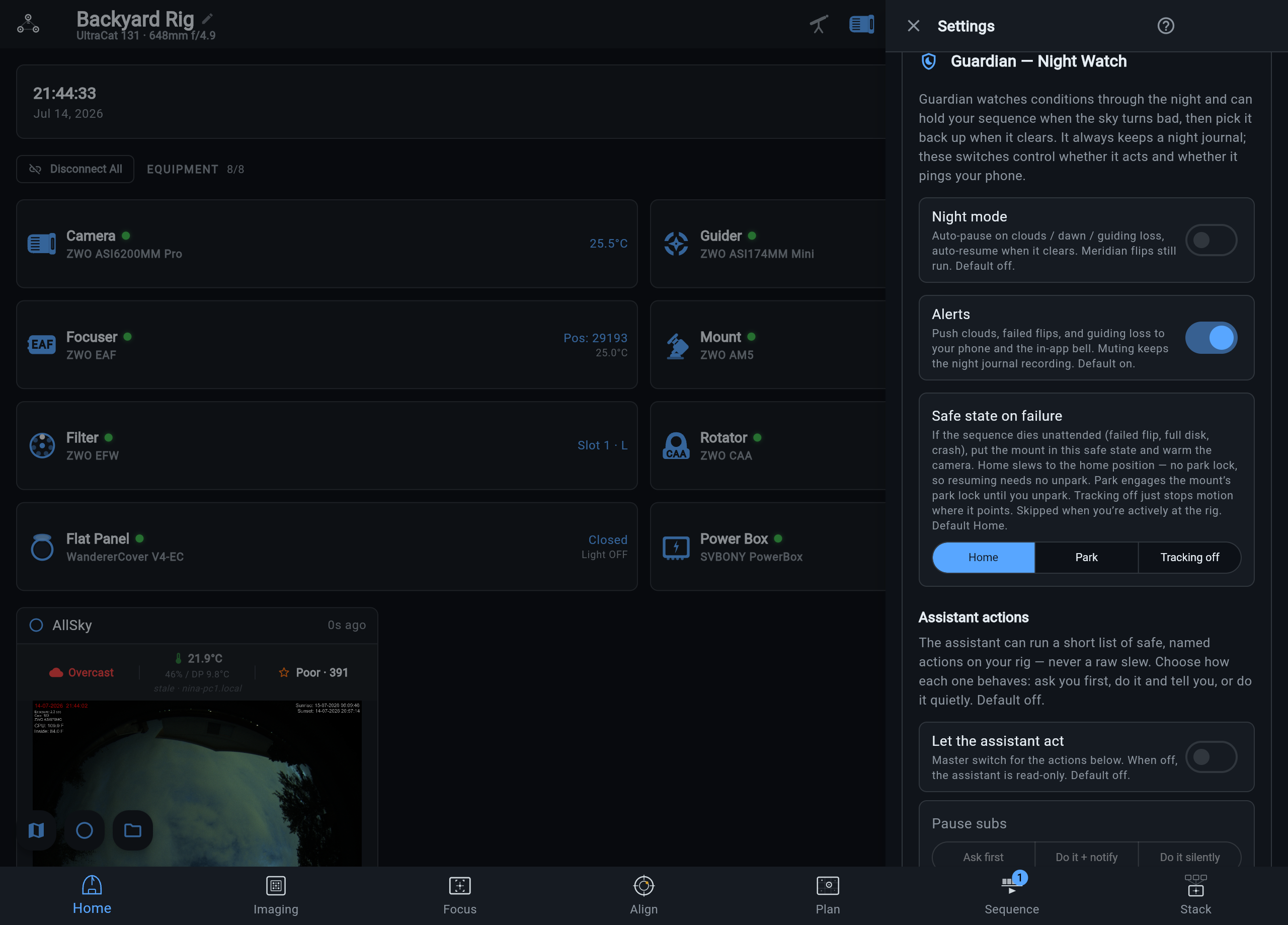
- Night mode — the auto-pause/resume switch. Default off.
- Alerts — the push and in-app notification leg. Muting it silences notifications but never stops the night journal. Default on.
- Safe state on failure — the three-way Home / Park / Tracking off selector. Default Home.
- GUPPI actions — the built-in GUPPI’s trust dial (Watch only, Ask before motion, Full autopilot), plus a per-playbook autonomy selector. Default Watch only.
Settings persist on the rig itself, so they apply no matter which device you connect from.